
Reclaiming Your Time in a Digital World
Today’s digital landscape can often feel overwhelming, with endless notifications and the pull of social media vying for our attention every second. This barrage of distractions makes it increasingly difficult to concentrate on critical tasks, especially for professionals who rely on uninterrupted workflow to meet deadlines and achieve goals.
In this challenging environment, browser extensions emerge as powerful allies in the pursuit of enhanced productivity. These tools not only simplify your online experience but actively work to minimize disruptions that can lead to decreased efficiency. Imagine being able to harness the full potential of your browsing capabilities while keeping distractions at bay.
Minimize Distractions
One of the primary advantages of browser extensions is their ability to control your online environment. Extensions like StayFocusd or Forest allow you to set limits on time spent on distracting websites. For instance, if you find yourself often wandering to Twitter or YouTube during work hours, these extensions can block access, ensuring you remain focused on your tasks. By imposing these self-regulated barriers, you can cultivate a more conducive workspace that reinforces your productivity goals.
Improve Time Management
Tracking how you spend your time online is crucial for effective time management. Extensions such as Toggl or RescueTime provide comprehensive insights into your browsing habits, enabling you to identify time sinks that you may not even be aware of. For example, you might discover that you’re spending hours on emails or reading articles outside your work scope. By visualizing this data, you can adjust your habits, allocate time wisely, and prioritize work that truly matters.
Enhance Focus
Blocking distracting websites is a highly effective method to enhance focus. Tools like Cold Turkey and FocusBlocker can help you create a distraction-free zone tailored to your working hours. This means you can concentrate intensely on your main tasks without the temptation to check notifications or browse the web aimlessly. With fewer distractions tugging at your attention, you can engage in deep work more easily.
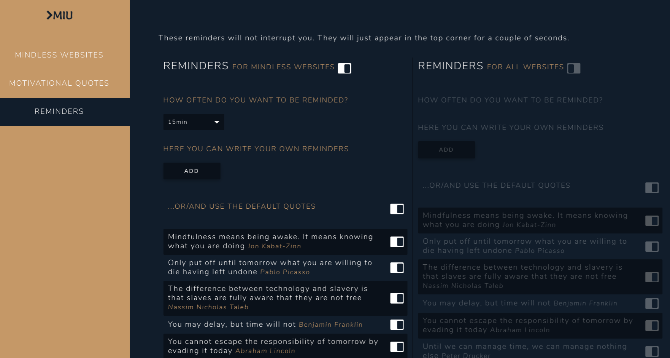
Interestingly, a study by the American Psychological Association highlights that it takes, on average, 23 minutes to regain focus after an interruption. By employing browser extensions that reduce these interruptions, you are not only saving time but also improving the quality of your work. Rather than constantly bouncing from one task to another, you can approach your work with a refreshed mindset.
By implementing these powerful browser extensions, you are not simply adding new tools to your arsenal; you are fundamentally transforming how you interact with your digital environment. Get ready to explore these opportunities and take steps toward a deeply focused and productive work life. The right browser extensions can be the key to unlocking your full potential as a professional in today’s fast-paced technology-driven world.
DISCOVER MORE: Click here to enhance your productivity
Discovering the Power of Focus Tools
In an age where information overload is rampant, the need to maintain focus and productivity is more critical than ever. The right browser extensions can serve as your frontline defense against the distractions that clutter your digital workspace. With the ability to customize your browsing experience, these tools can not only help you ward off distractions but also empower you to enhance the quality of your work.
Control Your Online Environment
Leveraging browser extensions designed to limit your access to distracting sites can create a barrier between you and tempting diversions. Extensions like StayFocusd and LeechBlock allow users to specify which websites are off-limits during work hours. For example, you might choose to block sites like Reddit, Instagram, or any other social platforms that often distract you from your primary objectives. By setting these rules, you create a structure to your online behavior that promotes sharper focus.
Gain Insight Through Analytics
Understanding how you allocate your time online can provide invaluable insights into your productivity patterns. Tools such as RescueTime and Toggl automatically track your online activities, yielding detailed reports that help illuminate unproductive habits. You may discover you’re spending an unexpected amount of your day scrolling through news articles or checking social media instead of focusing on your work projects. This newfound awareness can spur you to make informed adjustments, ultimately enhancing your time management.
Strengthen Your Focus with Pomodoro Techniques
Another effective strategy for improving focus is embracing the Pomodoro Technique, which encourages a balance of work and breaks. Extensions like Tomato Timer and Pomodoro Tracker help you implement this method seamlessly into your workflow. By breaking your tasks into manageable segments, typically 25 minutes of focused work followed by a 5-minute break, you can maintain high levels of productivity without burning out. This rhythm keeps your mind fresh and allows for sustained concentration on projects that require deep thinking.
Curate Your Digital Space
Creating a minimalistic digital workspace is essential for reducing distractions. Browser extensions such as Tab Wrangler and OneTab help keep your browser clutter-free by automatically closing unused tabs or consolidating multiple tabs into a single list. This not only alleviates visual distractions but also streamlines your browsing experience, making it easier to locate the information you need promptly.
By integrating these browser extensions into your daily routine, you are empowering yourself to take control of your digital workspace. The adaptability of these tools ensures that you can tailor your experience to meet your individual needs and goals. Start experimenting with these productivity-enhancing extensions today and take the first step toward a more focused and efficient work life.
In a world filled with constant notifications and digital distractions, utilizing the right browser extensions can profoundly enhance your productivity. Here’s a look at some exceptional tools that can help individuals stay focused and on track, allowing them to maximize their work efficiency.
| Category | Key Features |
|---|---|
| Distraction Blockers | Enable users to block access to distracting sites during work hours, promoting increased focus. |
| Time Trackers | Help users monitor the time spent on various tasks and websites, aiding in identifying productivity patterns. |
| Focus Modes | Create designated periods where notifications are silenced, allowing deep work without interruptions. |
Each category of browser extensions serves a distinct purpose, yet collectively they form a robust strategy to diminish distractions. An extension designed to block distracting sites can dramatically reduce the urge to scroll through social media, while time-tracking tools can offer valuable insights into one’s working habits. Moreover, focus modes are ideal for those looking to enter a state of deep concentration.
By integrating these browser extensions into your daily routine, you’ll not only improve your focus but also gain valuable insights that can lead to enhanced productivity and a more structured workday. Exploring these tools may unlock your potential to manage time more effectively and achieve your professional goals.
DISCOVER MORE: Click here to enhance your team’s productivity
Enhancing Productivity with Personalized Features
While browser extensions commonly target distraction reduction and time tracking, many also offer personalized features that adapt to your unique workflow. These advancements cater to different working styles and preferences, making it crucial to choose extensions that resonate with your specific needs. In this section, we’ll explore some of the most effective extensions that enhance productivity through customized features.
Automatic Task Prioritization
Managing multiple tasks can often become overwhelming, which is where extensions like Trello and Todoist come into play. These tools not only help you keep track of tasks but also allow you to prioritize them directly within your browser. With their intuitive interfaces, you can drag and drop tasks where you see fit, ensuring that your most important work takes precedence. Some of these tools even integrate with your calendar, enabling you to allocate specific time slots for focused work on high-priority items. The ability to visualize what needs to be done provides a structured approach to productivity and minimizes the time spent deciding what to focus on next.
Block Notifications for Undisturbed Focus
In a world where notifications are constant, controlling them becomes essential. Extensions such as Flox and Focus@Will take charge of your notification settings by allowing you to configure which alerts can bypass your focus periods. For example, you might want to receive emails from your boss while silencing unnecessary updates from social networks. By setting these boundaries, you create a more serene working environment that promotes uninterrupted thought processes.
Leverage Visual Distractions with Dark Mode
For many, the visual aspect of their workspace can either enhance focusing or contribute to distraction. Browser extensions like Dark Reader apply a dark theme to your browser, reducing glare and making reading more comfortable, especially during long hours of work. The ability to switch to a visually relaxed theme helps retain focus by reducing visual fatigue related to bright screens, allowing you to concentrate on tasks without straining your eyes.
Incorporate Mindfulness with Focus-Boosting Music
Music can play a significant role in maintaining focus. Extensions like Binaural Beats offer specially designed soundscapes that promote concentration through auditory stimulation. This type of music uses different frequencies to help you enter deeper states of focus and creativity, transforming your work environment into a more engaging space. The integration of sound may bring certain tasks to life, providing the mental boost needed to tackle complex projects.
Experiment with Time Management Techniques
In addition to structured time tracking, extensions like Forest gamify the act of staying focused by allowing users to grow a virtual tree for every focused session completed. However, if you abandon your task, the tree dies, giving users a visual representation of their dedication to maintaining focus. This not only encourages discipline but also adds a layer of engagement to productivity strategies that might otherwise feel monotonous. Such inventive tools are especially appealing to younger users or those who thrive on gamified experiences.
By harnessing the unique and personalized features of these browser extensions, you can significantly enhance your productivity and make strides towards creating a focused work environment. With the right combination of tools, you have the potential to elevate your productivity to new levels while also enjoying a more customized and effective workflow.
DISCOVER MORE: Click here to learn about best practices
Maximizing Focus with the Right Tools
In a digital landscape fraught with distractions, leveraging browser extensions designed to enhance focus and productivity has become more crucial than ever. As we’ve explored, these tools offer diverse functionalities—ranging from automatic task prioritization to soundscapes that cultivate a conducive working atmosphere. By customizing your browser with extensions like Trello, Dark Reader, and Focus@Will, you can create a tailored environment that works best for your unique workflow and cognitive needs.
Investing time to experiment with various extensions allows you to pinpoint the features that resonate with your style, whether that’s minimizing visual strain through dark mode or blocking unnecessary notifications that disrupt your concentration. Not only do these tools foster a more disciplined approach to your daily tasks, but they can also make your work feel less like a chore and more engaging, especially with gamified methods like Forest.
Ultimately, the combination of these browser extensions serves as a comprehensive strategy to combat distractions effectively. Embracing these innovative solutions can elevate your focus and efficiency, ensuring that your workday is as productive as possible. Take the time to explore these resources and unlock potential new levels of productivity in your professional life. After all, in a world that continually vies for your attention, mastering focus is an invaluable skill worth cultivating.
Related posts:
The Role of Gamification in Enhancing Task Completion Rates
How to Use Virtual Assistants to Organize Your Schedule and Improve Focus
5 Must-Have Apps to Boost Your Daily Productivity
The Impact of Digital Minimalism on Personal Productivity
How to Create a Customized Digital Workspace for Optimal Productivity
The Best Tech Gadgets for Maximizing Focus and Efficiency

Beatriz Johnson is a seasoned tech writer and digital tools expert with a passion for simplifying the complexities of technology and mobile applications. With over a decade of experience in the tech industry, she specializes in topics like productivity apps, software reviews, and emerging digital trends. Through her work, Beatriz empowers readers to make informed technology choices and stay ahead in the ever-changing world of apps and innovation.